 Take a Selfie
Might you add a photo to your contact details in ChurchSuite? These details are only visible to members of the church family and it helps to see each other's faces. You can use an image from your phone, or snap your face from a group photo you like.
If you come along to Holy Trinity Ashby, and would are not yet on ChurchSuite, please register your details.
If you have not got the MyChurchSuite App, you can download it from the App Store or Google Play. When you open the app it, follow the instructions and then type "Holy Trinity Ashby" to find our church.
You will then be guided through settting up your own login, or resetting your password.
The App enables you to see contact details for church members (who choose to share them), our calendar, your rota duties and and other links.
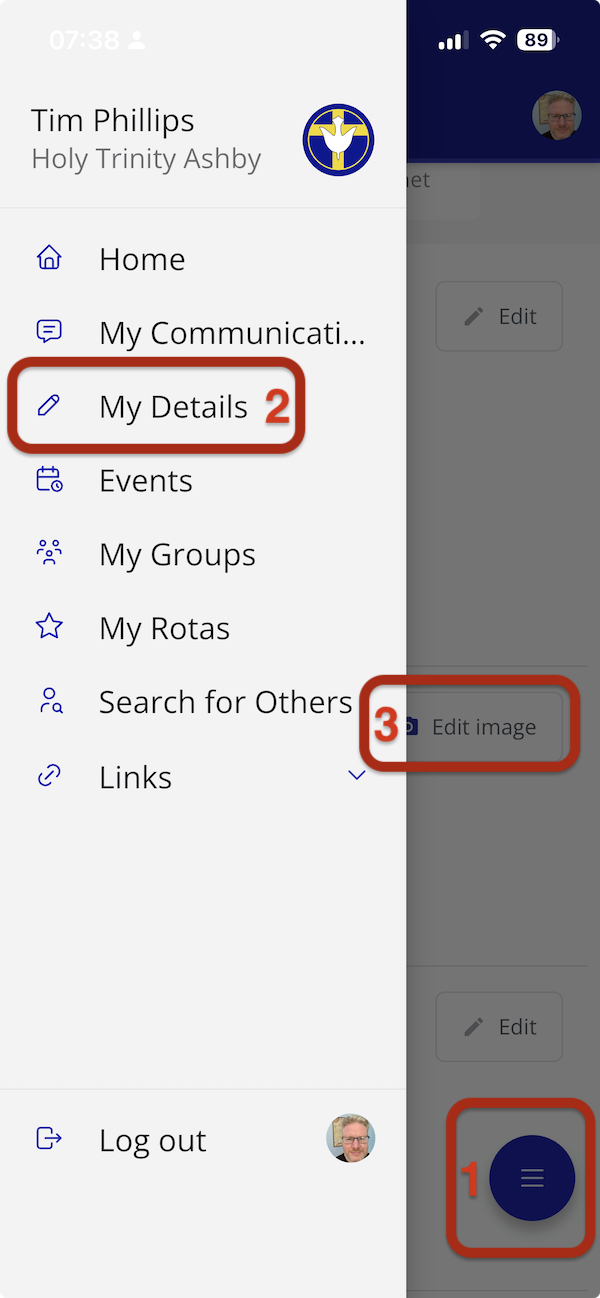
To add a photo, when MyChurchSuite is running, open the "hamburger" menu (by tapping a blue circle with three horizontal lines on the bottom right of your screen), and then choose My Details (2 below) and Edit Image (3)